

- Home
- Provider
- Resources
- Eligibility and benefits
- prefix-lists
Member ID Prefixes
2026 List – Effective 7/1/26 (Excel)
Previous versions:
2026 List – Effective 1/1/26 (Excel)
2025 List - Effective 7/1/25 (Excel)
2025 List - Effective 1/1/25 (Excel)We have moved our member data to a more robust platform. In some cases, we assigned a new member ID prefix to help us track members in both systems. The updates are now complete, but you may still need to use a member’s original prefix for previous dates of service.
Use the table below to help select the correct prefix for the date of service in your transactions. Discontinued prefixes remain active for previous dates of service. Please note that prefixes may also change when a member takes a job with a different employer or switches to a different type of benefit plan.
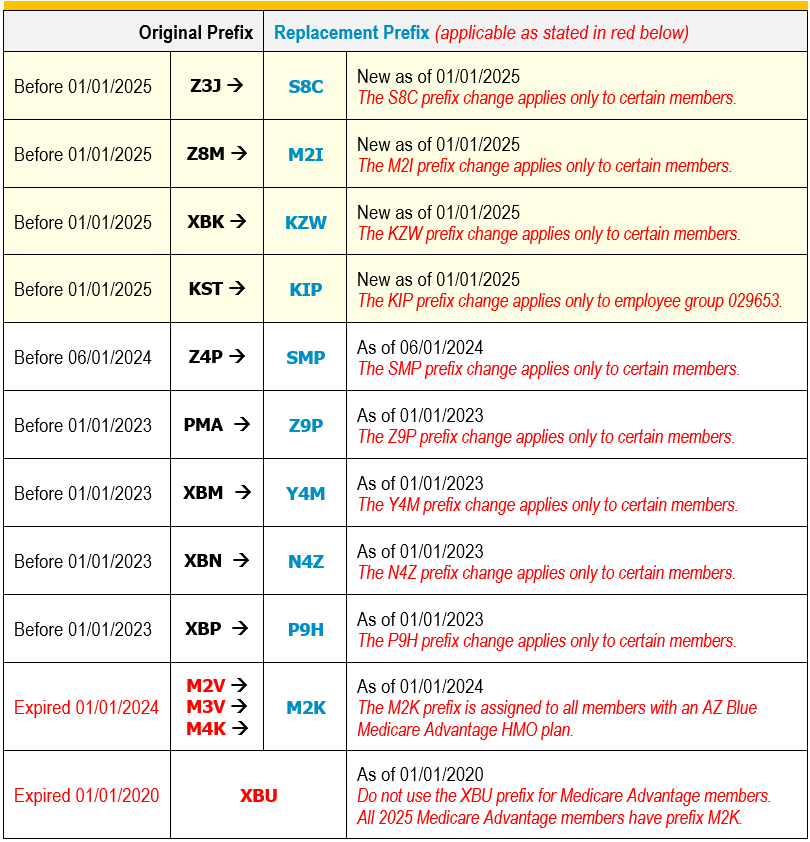
The member ID prefix you use for searches or claim submission must be valid for the date of service.
- Eligibility/Benefits
If you search with a member ID prefix that isn’t valid for the service date, you will receive an “inactive” status. In this scenario, try your search again with the other prefix. - Your claims must have the correct prefix for the date of service
If you submit a claim using a prefix that isn’t valid for the service date, you will receive a message advising you of the prefix replacement:
“The member ID prefix you entered does not match the prefix on file for this service date. Please resubmit with the correct prefix (see azblue.com/prefix).”In this scenario, submit your claim again with the other prefix.
- Remits
On the Availity Essentials™ provider portal, you have several search/filter options to find your remits.
- Eligibility/Benefits
BCBS member ID prefixes are used to quickly route claims and electronic inquires. Prefixes may also indicate specific network and benefit plan information. Most prefixes are the first three characters of the member ID and may be a mix of letters and numbers (e.g., P9H, 99D, Y4M, Z9P). FEP plans use just the letter “R” as the prefix. If an ID does not include a prefix, please check the back of the card for instructions on validating eligibility, submitting claims, and contacting customer service.